DOCUMENTS & DIAGRAMS / WORKED EXAMPLES

From supplied text.
To a finished file.

See the starting text beside the document or diagram created from it. Open the files to inspect the result, then explore a later correction below each example.

01 / DOCUMENT

Supplied words.
A structured document.

The approved fictional supply-review text becomes a two-page document with headings, a table and numbered pages. The Word file and PDF carry the same supplied text.

Supplied text

BEFORE

The exact approved text for this example. Scroll to read the full input.

Print room supply review

Fictional example for layout review

This review records the supplies counted in a fictional print room on 6 October 2026. The four lines contain 60 units in total. Use the count to prepare an internal replenishment discussion after the labels and storage locations have been checked. No purchase has been approved.

Counted supplies

One sealed pack is counted as one unit, regardless of the number of sheets or pieces inside it. The table preserves the labels used for this exercise. A blank, damaged or conflicting label would be recorded for review rather than resolved by guessing. All entries below are invented and contain no customer or employee information.

Item

Label

Units

Storage

Presentation folders

Slate

24

Shelf A

Card sets

Café blue

18

Shelf B

Label rolls

Plain white

12

Shelf C

Envelope packs

Cream

6

Shelf D

Total

All four lines

60

Print room

The label-roll count is 12 units. Keep the four item lines separate in any later summary so that a change to one count cannot silently alter another line. Storage locations describe this fictional exercise only.

Checks before use

Match each item name and colour label to the agreed source before changing the layout.

Check the sum of the four item counts and repeat that total consistently in the opening and table.

Keep unresolved quantities visible and ask for a confirmed value before issuing a revised copy.

Review and handoff

The reviewer should compare the readable file with the approved text line by line. The intended result is a compact document that another person can open, read and revise without having to infer which figures or statements were changed. The layout may improve spacing and hierarchy while preserving the stated facts, list order and table relationships.

Handling a correction

Record a correction as a specific instruction with the affected item, old value and new value. Keep the baseline copy. Apply the instruction to every dependent total or sentence, then compare the revised document with that baseline. Any unrelated wording change should be removed or separately approved before the revised file is treated as ready for review.

For this example, the opening total, the table values and the count note form one linked set. A corrected count must agree across that set. The other item counts, storage locations and colour labels must remain unchanged. Page numbers help the reader see that both pages belong to the same version, but they do not replace a content check.

Acceptance for this example

Accept the layout only when the text is complete, the table is readable, accents display correctly, and no line is clipped or hidden. Check the editable document and its PDF separately. The PDF is a reading copy. Its successful export does not establish identical behaviour in every version of Word or prove that it meets an accessibility standard.
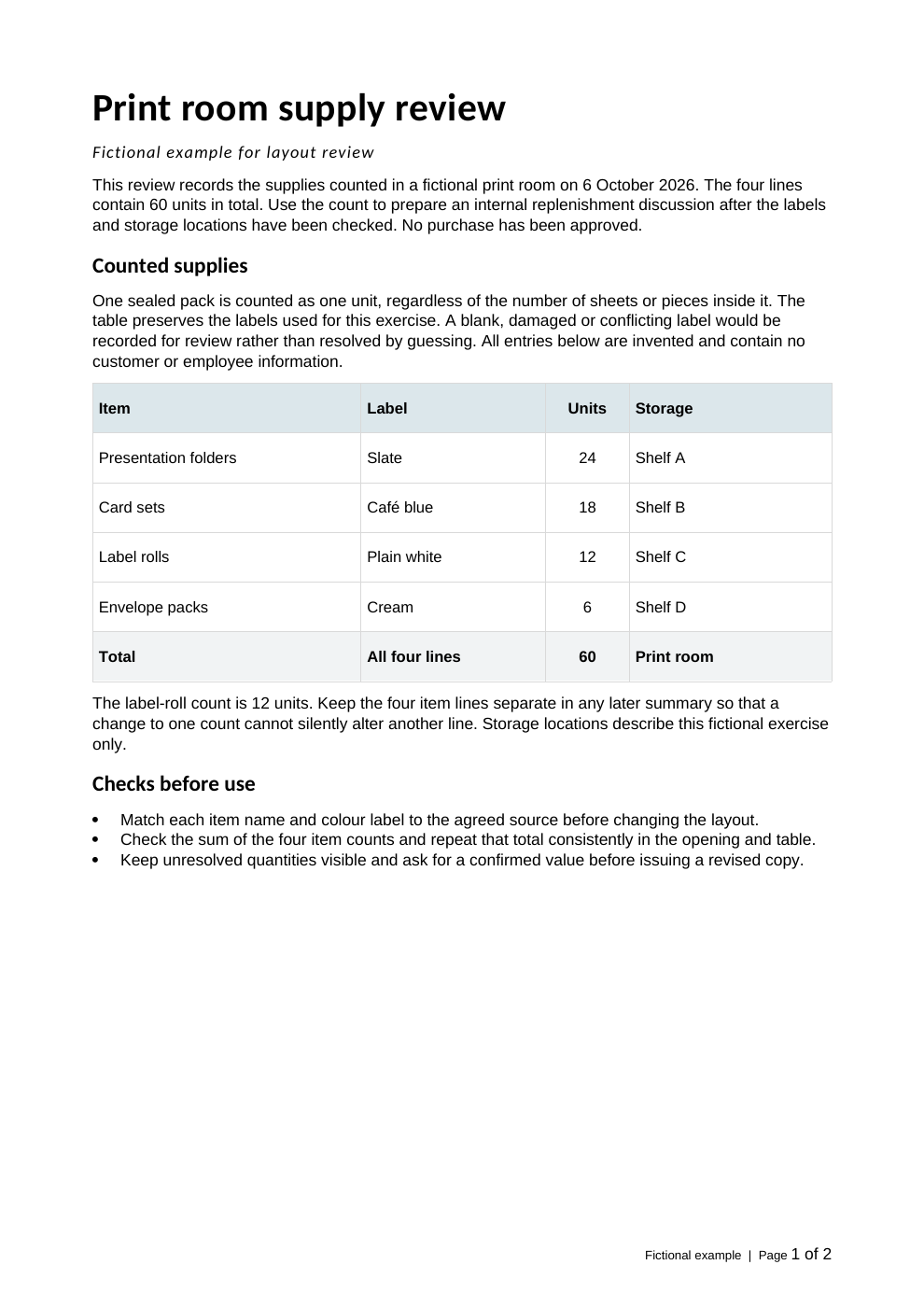
The same content, made easier to read. The supplied words, counts and table relationships are retained in an editable document and its PDF reading copy.

What this document example covers

Short English documents made from approved text, with straightforward headings, lists and tables, delivered as DOCX and PDF. “Approved text” here means the fixed text for this fictional exercise.

The PDF was rendered from the DOCX with LibreOffice. Native Microsoft Word behavior, arbitrary file repair, OCR and complex documents have not been tested. No accessibility certification or physical print result is claimed.

Later revision: change a count and its totals

After the first document was created, this separate instruction tested a specific correction.

THE REQUESTED CORRECTION

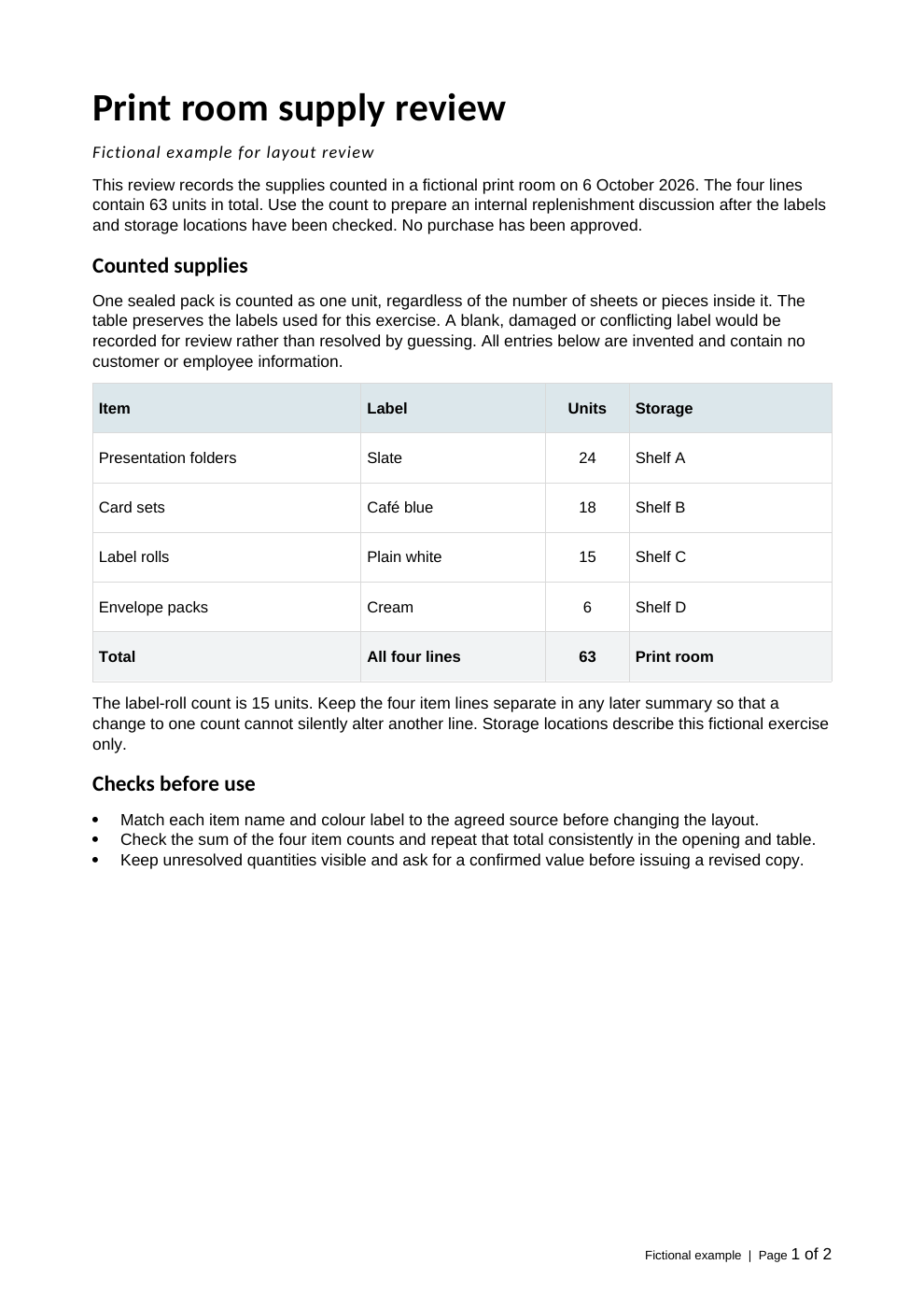
Change label rolls from 12 to 15. Update the total from 60 to 63 in the opening and table, and update the count note. Keep the other text and figures unchanged.

Download revision brief TXT
Page one after the later correction. Label rolls: 15. Total: 63.

The revised document

The table, opening total and count note stay in step. Compare this revision with the original output above.

02 / DIAGRAM

Written steps.
A visible workflow.

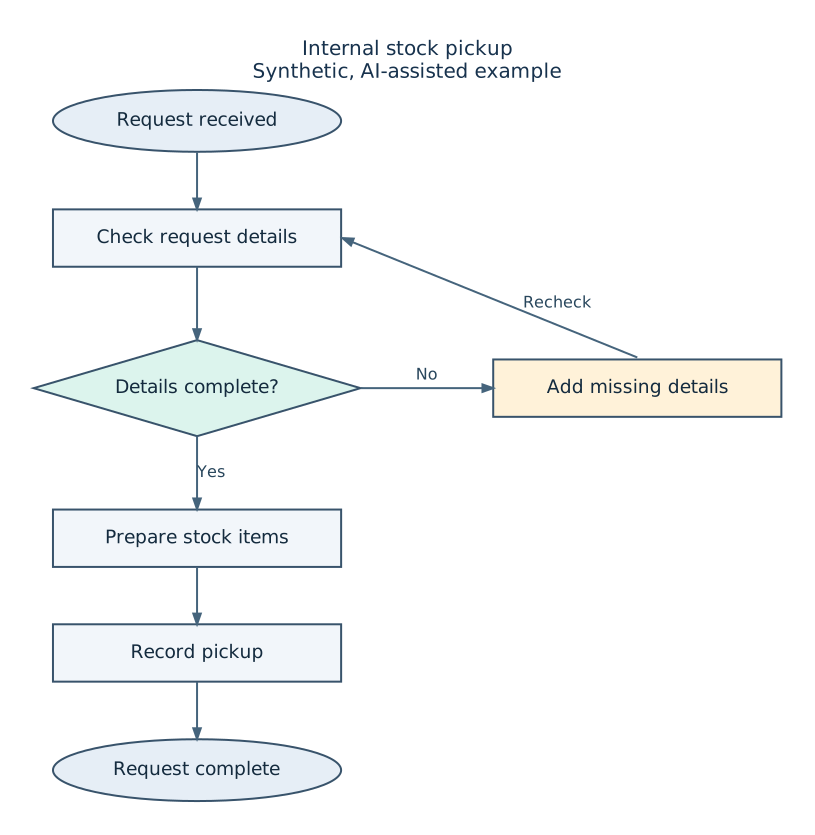
Seven supplied labels and their directed connections become a stock-pickup diagram, including the Yes/No decision and return loop.

Written steps & connections

BEFORE

The original supplied labels and connections, presented as a readable list. These relationships were explicit in the starting instructions.

Node labels

  1. Request received (start)
  2. Check request details (process)
  3. Details complete? (decision)
  4. Add missing details (process)
  5. Prepare stock items (process)
  6. Record pickup (process)
  7. Request complete (end)

Directed connections

  1. Request received → Check request details
  2. Check request details → Details complete?
  3. Details complete? → Add missing details No
  4. Details complete? → Prepare stock items Yes
  5. Add missing details → Check request details Recheck
  6. Prepare stock items → Record pickup
  7. Record pickup → Request complete

The instructions also specified a top-to-bottom layout, start/end ovals, process boxes and a decision diamond.

Written relationships, made visible. The diagram follows the supplied labels, branches and return direction. DOT holds the relationships; SVG is the vector drawing.

What this diagram example covers

Small diagrams redrawn from explicit node labels and directed relationships, delivered as DOT source and SVG. The SVG contains text and vectors.

These files do not provide native Visio, draw.io or PowerPoint connector behavior. The example checks the supplied relationships; it does not validate a real process or its decisions.

Later revision: change one label

After the diagram was created, a separate instruction changed one label while keeping the relationships intact.

THE REQUESTED CORRECTION

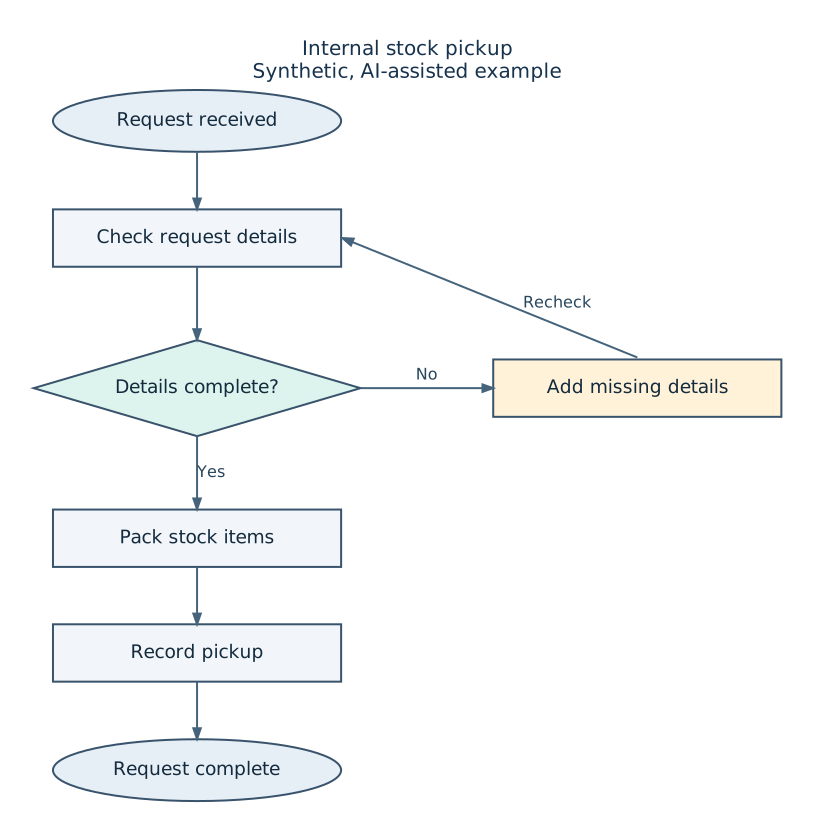
Change “Prepare stock items” to “Pack stock items”. Keep the other labels, node types and directed relationships unchanged.

Download revision brief TXT
The later revision changes Prepare stock items to Pack stock items. The same seven nodes and directed relationships remain.

The revised diagram

The Yes and No branches and Recheck loop remain unchanged. Compare the label with the original output above.

START WITH A SHORT DESCRIPTION

Have a document
or diagram to untangle?

Tell us what needs doing, the approximate length or size, and the output you need. We’ll confirm the fit, scope and file handling first.

Email hello@tidyrocket.com

Please don’t attach files or include private details yet. An inquiry does not place an order. Scope, availability and any quote are agreed separately.